Feed the Cups Challenge Mode: Subway Unlocks and Direct Store Rules
Unlock the Subway Station after Food Street, compare the daily and random Direct Store Challenge modes, and review extra modifier pools, events, and rewards.
Part of Feed the Cups Guide: Shop Day, Rent, Stars, Combos, and Residential Area.
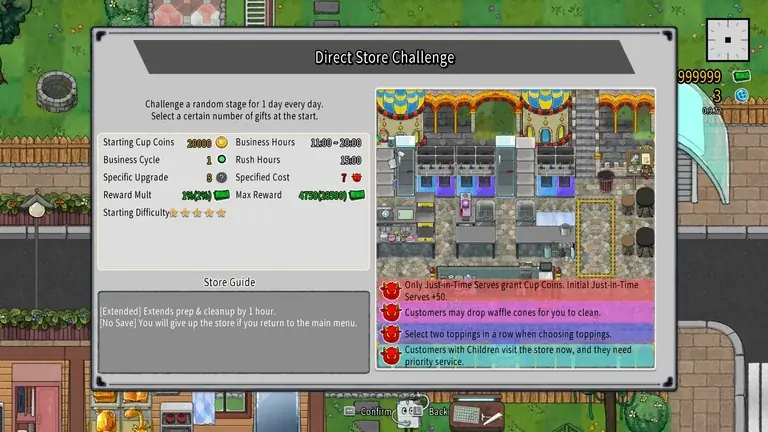
To unlock the Subway Station and its  Direct Store Challenge, clear all 4 stores in Food Street on the lowest difficulty to earn the
 Street Food achievement and build the House with a Living Room home upgrade. Once open, the station gives you 2 single-day modes running from 11:00 to 20:00 — a fixed Daily Designated Direct Store synced to the date on Steam and a Random Direct Store that refreshes after each run — while layering extra hazards from 24 first-pool and 9 second-pool modifiers alongside 1 relief effect from 8 Subway events. Unlike regular chapter progression, Subway runs award stage completion payouts and post total profit to daily leaderboards without counting toward regular stage clears or a stage’s First Clear Reward.
New store owners still learning daily prep, stress limits, and rent cycles should read our Feed the Cups beginner’s guide before tackling Subway shifts.
How to Unlock the Subway Station
Reaching the Subway platform follows a fixed house-upgrade path tied to Chapter 2 progression:
- Finish all 4 stages in Food Street on the lowest difficulty to complete the Street Food achievement and claim the House with a Living Room blueprint.
- Upgrade to the House with a Living Room, which expands your living room for watching television and opens the Subway Station alongside the Direct Store Challenge.
- Plan on unlocking the platform in the full game, because Food Street is locked in the demo; see our chapters and stages guide or browse all 8 districts in the chapters directory to plan your route through the early maps.
- Wrap up any unfinished standard stage before boarding, because the station refuses entry while another shift remains active, and bring every co-op teammate into the station to depart together.
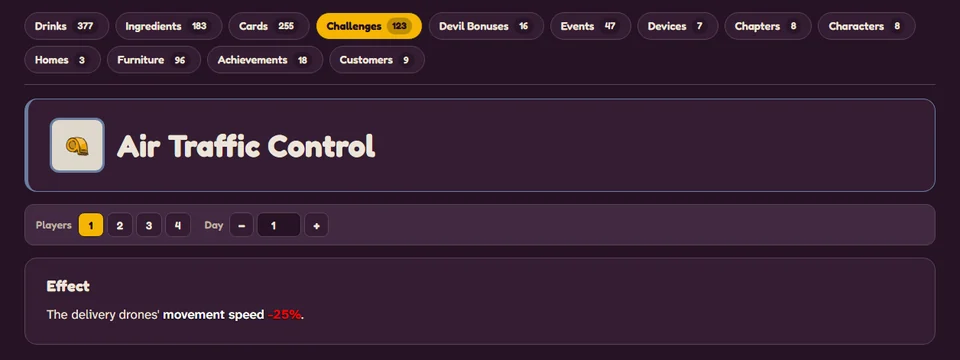
Daily Designated vs. Random Direct Store Rules
Every Direct Store Challenge compresses a full run into 1 day from 11:00 to 20:00 and begins with several card-picking rounds so you assemble a deck upfront. Stages, drink menus, shop layouts, events, extra difficulty modifiers, and equipment upgrades all roll into each setup, and stages from all 8 chapters are available in the station pool.
In random mode, the game selects a cleared stage (excluding the tutorial) across 4 scene variants and sets the displayed daily rent to 10 times the base rent. Subway Mode also mixes in layouts and difficulty modifiers that do not appear in standard chapter shifts. Inside the Subway, the host can adjust customer traffic at the Order Counter, check the current difficulty and contracts, or tap Give Up during card selection to abandon a bad draw right away.
Daily Designated Direct Store
- Ties its stage and random modifiers to the Steam calendar date under the Specific Upgrade and Specified Cost structure.
- Lets you retry the exact same daily store as many times as you like so you can experiment with different gift picks and contract rerolls.
- Entry requires a Subway Fare in Cash scaled by team size, with only the party leader paying.
Random Direct Store
- Uses the Random Upgrade and Random Cost ruleset and generates a fresh random setup after every challenge.
- Allows only one attempt per Direct Store before that offer refreshes into a new setup.
Extra Modifier Pools and Subway Events
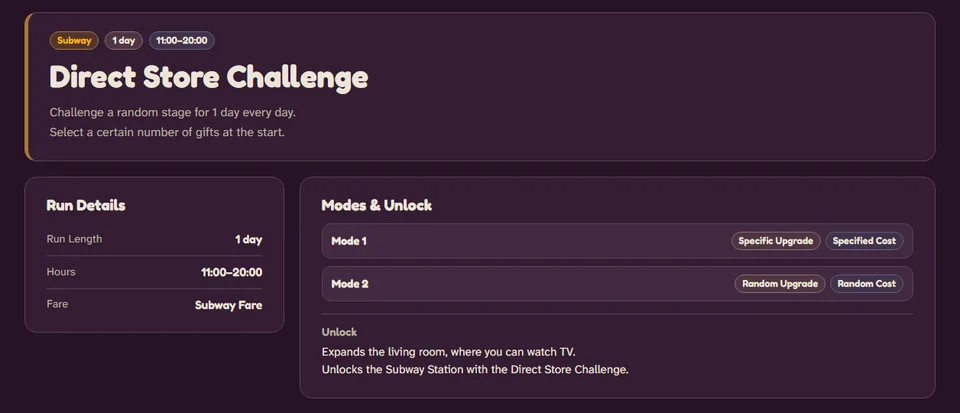
Out of 54 stage difficulty modifiers, the Subway pulls extra hazards from a primary pool of 24 modifiers and a second pool of 9 modifiers. All 9 hazards in the second pool also appear inside the 24-modifier pool.
- Disruptive visitors and specialty cups in the 24-modifier pool add Thieves, Troublemakers, Critics expecting fresh ingredients, double-ordering Students, Influencers, Inspectors, Customers with Children who demand priority service, Big Bottles, Two-Handled Cups, English Teacups, Japanese Teacups, and Homeless Cups.
- Shop hazards in that same 24-modifier pool introduce daily brief power outages, equipment breakdowns that need repair, and bug infestations.
- Pressure rules in the 9-modifier second pool mix all customer types together, spawn customer trash that drives stress upward until cleaned, enable phone orders, trigger hazards that make you drop held items and gain stress when hit, and send a supervisor pacing back and forth to block walkways.
- Strict payout rules inside the 9-modifier second pool restrict Cup Coins to a single trigger — Quick Serves, Just-in-Time Serves, Prioritized Serves, or Crits — while granting +50 initial triggers of that serve type.
To balance those extra hazards, each shift rolls 1 helpful daily event from a pool of 8 positive effects out of the 47 daily events in the events directory:
 Happy Serving+ gives the Drink Server a 50% chance to drop stress by 1 whenever a drink sells, and Favorite Order+ gives the Order Taker a 50% chance to drop stress by 1 whenever an order is taken.
- Self-Regulation+ cuts stress for All Staff by 1 every 30 minutes before overtime, while Vaccination+ trims stress gain by 50% during business hours.
- Finger Strength makes All Staff perform manual work — squeezing, stirring, opening lids, chopping, and beating — extremely fast, and Tolerance+ extends customer order wait time by 50%.
- Sunny and Breezy stops missing ice on Iced orders from hurting your rating, while Sugar-Free Day drops sugar requests from customer orders altogether.
How Subway Rewards and Builds Differ From Regular Chapters
Subway challenges sit outside normal campaign progression across the 8 chapters and handle payouts, leaderboards, and card timing differently:
- Finishing a Subway shift never counts as clearing that stage in a regular chapter, so running a map through the station will neither award nor block that stage’s First Clear Reward.
- Settlement payouts lean sharply toward surviving the full day: failing to complete the stage cuts your reward, whereas finishing the shift pays out more.
- Total level profit uploads to daily leaderboards that reset on the date on Steam, with a friends view for comparing scores against your squad.
- Single-day shifts also unlock special opening bonuses on cards meant for multi-day carryover:
 Preserved Flower starts Subway stages with Combo +100, and Preserved Flower+ boosts that opening head start to Combo +200.
For deck synergies, cost pairings, and upgrade priorities during those opening Subway card rounds, check our best cards and builds guide.
In This Guide
Sources
- Feed the Cups game files (Steam build 25975646 (demo 2400400, extracted 2026-11-21))
- Steam Developer Announcements — Feed the Cups (App 2336220)https://store.steampowered.com/news/app/2336220/
- Steam store screenshots and developer announcements (Steam App 2336220)